The Instagram post size to export for the feed is 1080 x 1350 pixels, a 4:5 portrait. Instagram, Meta's photo and video app, keeps photos 320 to 1080 px wide at full resolution when the ratio sits between 1.91:1 and 3:4, and crops anything outside that range. A square grid is no longer the safe guess: the profile grid now previews posts at 3:4.
Max upload width: 1080 px (Instagram Help Center)
Min width: 320 px; narrower photos are enlarged
Feed ratios: 1.91:1 to 3:4 (566 to 1440 px tall at 1080 px wide)
Formats: JPG, PNG, BMP, non-animated GIF; video MOV or MP4 (Buffer)
Instagram post size cheat sheet for 2026
The right Instagram size depends on the format: 1080 x 1350 px for a portrait feed post, 1080 x 1920 px for Stories and Reels, and 320 x 320 px for a profile photo. Feed limits are from the Instagram Help Center; the other Instagram dimensions are from Buffer (March 17, 2026) and Your Social Team (July 22, 2026).
Instagram sizes by format
Format
Size in pixels
Aspect ratio
Where it shows
Portrait post
1080 x 1350
4:5
Feed; the format Buffer recommends
Tall portrait post
1080 x 1440
3:4
Feed; the tallest ratio Instagram accepts
Square post
1080 x 1080
1:1
Feed; trimmed at the sides in the grid
Landscape post
1080 x 566
1.91:1
Feed; the widest ratio Instagram accepts
Carousel
Same as the first slide
Set by the first slide
Feed, up to 20 slides
Story
1080 x 1920
9:16
Full screen; about 250 px free at top and bottom
Reel and Reel cover
1080 x 1920
9:16
Full screen; the cover shows at 3:4 in the grid
Profile photo
320 x 320
1:1
Shown as a circle
Grid preview
1080 x 1440
3:4
Profile grid tile
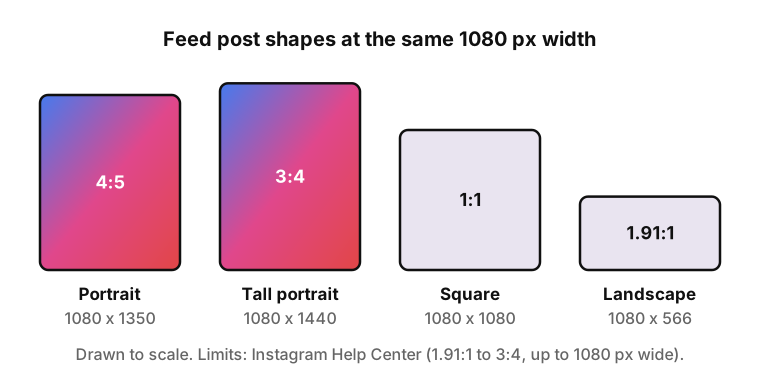
The four feed shapes at the same 1080 px width: only the height changes.
Instagram post dimensions by format
Instagram post dimensions differ by where the post appears: the feed, the full-screen viewer or the round profile photo.
Portrait post: 1080 x 1350 (4:5)
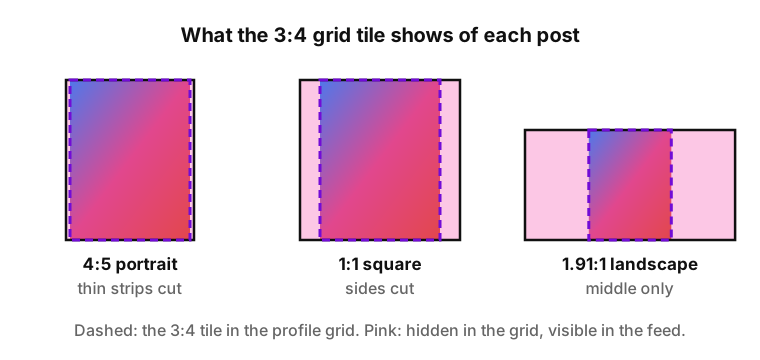
A 1080 x 1350 px portrait takes more feed space than a square, and schedulers handle this post size reliably. The Instagram portrait size suits people, products and text-heavy graphics. In the 3:4 grid it loses a thin strip at each side.
Tall portrait post: 1080 x 1440 (3:4)
The new Instagram post size, 1080 x 1440 px, is the tallest ratio the Help Center lists and matches the grid tile exactly. Your Social Team warns that some schedulers, such as Later and Planoly, crop or do not support 1440 px uploads, so test one post first.
Square post: 1080 x 1080 (1:1)
A square post fills the feed at 1080 x 1080 px. The 3:4 grid tile is taller, so the preview cuts the left and right edges; keep logos and faces away from them.
Landscape post: 1080 x 566 (1.91:1)
At 1080 x 566 px a landscape post is the widest shape Instagram keeps; anything wider gets cropped. This post size shows small in the feed and loses most of its sides in the grid.
Carousel posts with mixed sizes
A carousel holds up to 20 photos or videos since August 2024 (Business Today), and the first slide sets the ratio for the rest, according to Buffer. The mixed option keeps slides of different sizes uncropped. iGram can save every slide of a carousel.
Instagram story dimensions
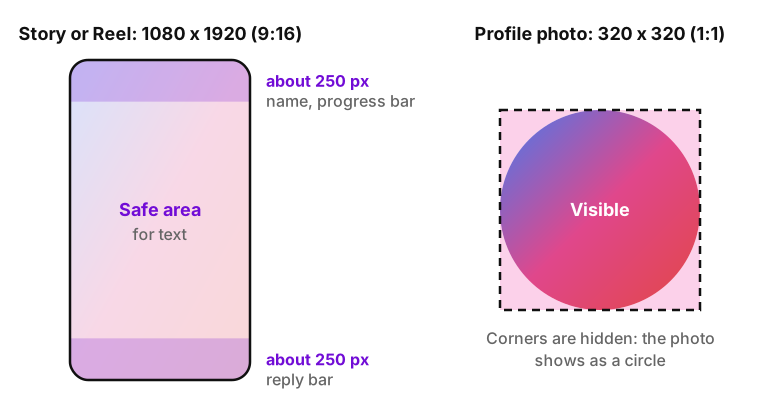
Instagram story dimensions are 1080 x 1920 px at 9:16. Buffer advises leaving roughly 250 px free at the top and bottom, under the profile name and reply bar. Safe zones are in the Instagram story size guide; iGram can save Instagram Stories.
Illustration: a 9:16 story with free bands at the top and bottom, and a profile photo cut to a circle.
Reels size and cover
A Reel and its cover are both 1080 x 1920 px. In the profile grid the cover is cut to a 3:4 tile, so keep the title and face in the middle. iGram can download a Reel by its link.
Instagram profile picture size
A profile photo is 320 x 320 px, displayed as a circle everywhere in the app, so the corners never show. Center the face or logo; highlight covers are round too. iGram has pages for Story highlights and a profile picture.
How the 3:4 profile grid crops your posts
The Instagram ratio for grid previews is 3:4: every post shows as a 1080 x 1440 px tile. A 4:5 post loses a narrow strip on each side, a square loses more, and a landscape keeps only its middle. Your Social Team (July 22, 2026) credits the change to Adam Mosseri, head of Instagram, who said most content posted is not square.
Keep text and faces in the center of the frame. Users on older app versions may still see square previews, so the center works in both. A grid banner over three posts uses a 3240 x 1440 px canvas, published from the right tile backwards.
Illustration: the dashed 3:4 tile over each feed shape; the shaded parts are hidden in the grid.
Why Instagram crops, enlarges or compresses a photo
The Instagram photo size limits in the Help Center decide when a photo is changed. Each case has a fix before upload.
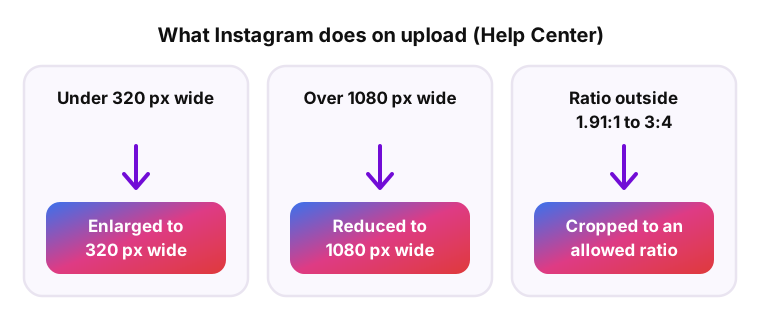
Three upload rules from the Instagram Help Center: enlarge, reduce or crop.
Narrower than 320 px. Instagram enlarges the photo to 320 px wide, and it looks soft. Start from a larger file.
Wider than 1080 px. Instagram scales it down to 1080 px wide. Export at 1080 px yourself to control the result.
Ratio outside 1.91:1 to 3:4. Instagram crops it to an allowed ratio, and the edges disappear. Crop or extend the canvas first.
JPEG, the usual Instagram photo format, is lossy: every re-save throws away detail. Export once at 1080 px wide instead of saving the same file several times.
How to make a picture fit on Instagram without cropping
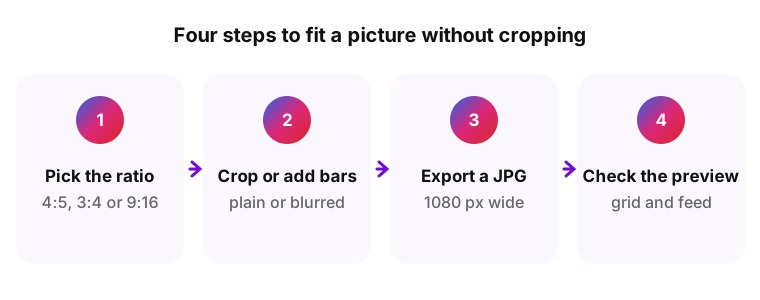
Matching the Instagram image size takes four steps. Start from a file at least 1080 px wide: a smaller one can be resized, but it will not gain detail.
Illustration: four steps from choosing the ratio to checking the preview.
Pick the ratio for where the post will appear
Choose 4:5 for the feed, 3:4 when the grid preview matters most and 9:16 for Stories.
Crop or extend the canvas
Crop in Instagram or the Photos app, or extend the canvas with plain or blurred bars in an editor such as Canva.
Export at 1080 pixels wide
Export a JPG 1080 px wide at the height of your post size, for example 1350 px for 4:5.
Check the grid and feed preview
Look at the preview before you publish, then write the caption. If you post through a scheduler, test one post first.
What size you get when you download an Instagram post
iGram saves photos as JPG and videos as MP4 from public posts. A photo is the JPG Instagram stores, up to 1080 px wide, and the size is the same on every plan. Free videos are standard quality, with no limit on the number of files; HD and 4K video and MP3 come with Premium. Private accounts are not supported, and links and files are not stored.
Both. The feed accepts 4:5 and 3:4, and the grid previews posts at 3:4. Use the 4:5 post size with a scheduler and 3:4 when the grid look matters more.
Neither is the feed standard. Both landscape shapes fit the 1.91:1 to 3:4 range, so they are not cropped, but they show smaller than a portrait. 16:9 is the usual shape of horizontal video.
Choose the mixed option when you build the carousel. Portrait slides stay at 4:5, and landscape or square slides get space above and below. Without it, every slide takes the ratio of the first one.
Usually the file is narrower than 1080 px and Instagram enlarges it, or a JPG was re-saved several times. Export once at 1080 px wide and turn on "Upload at highest quality"; menu names can differ.
JPG for photos and PNG for graphics with text. Buffer lists JPG, PNG, BMP and non-animated GIF for images and MOV or MP4 for video.
The JPG Instagram stores for the post, up to 1080 px wide in the post's ratio, and the size is the same on every plan. Open the file info to see its exact width and height.
Yes, for a public post: download it with iGram and open the file details. The file has the size Instagram stores: uploads wider than 1080 px are scaled down to 1080 px.