The iGram Instagram highlight downloader opens every story from the highlights of a public profile in one gallery, each with the date it was posted. Paste the profile link, find the story you want and save it as a JPG photo or an MP4 video. You don't need an Instagram account, and the author isn't notified.
- Paste
- A profile link with the username, instagram.com/username
- You see
- Every highlight story with its publish date, plus the highlight covers
- You save
- One story or cover at a time: photos as JPG, videos as MP4 with their music, stickers kept
- Quality
- Lower quality for free, HD and 4K with Premium
- Access
- Public accounts only, no Instagram login
How to download Instagram highlights
To download Instagram highlights, copy the profile link, paste it above and save the stories you need from the gallery. The username in the link is all iGram needs, so it works the same for one highlight or ten.
-
1
Copy the profile link
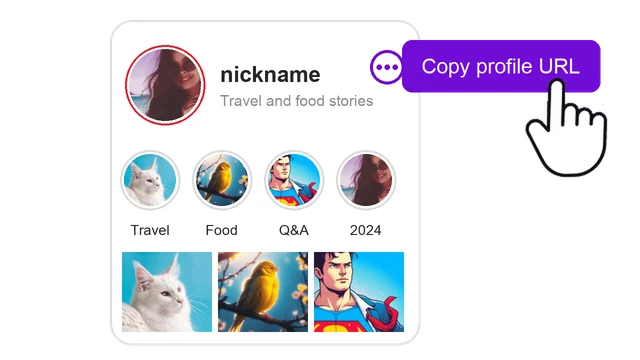
In the Instagram app, open the profile, tap the three dots at the top and choose Copy profile URL. In a browser, copy the address instagram.com/username.
-
2
Paste it and press Download
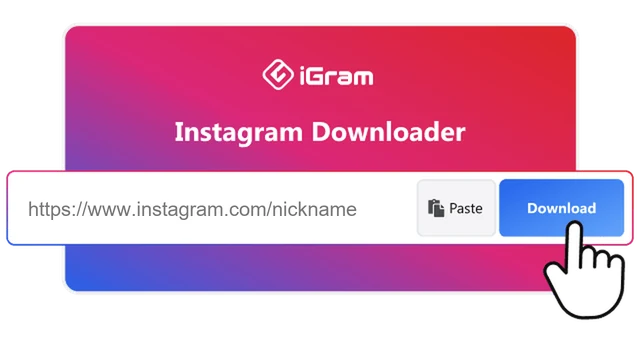
Paste the link into the field at the top of this page and press Download.
-
3
Find the story and save it
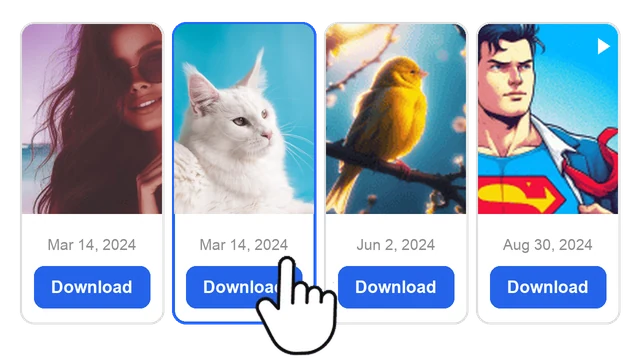
The gallery shows every story from the highlights with its date. Press Download under the one you need.
What you get from an Instagram highlight
Each story from a highlight saves as its own file, with the author's text and stickers in place, and video stories keep their music. iGram doesn't pack a highlight into one archive: you pick stories one by one, and the date under each helps you find the right one.
Files you get when you download Instagram highlights with iGram
| Story in the highlight |
What you get |
| Photo story |
JPG file with the author's text and stickers |
| Video story |
MP4 file with sound and stickers |
| Highlight cover |
The round cover image, saved separately |
Free downloads come in lower quality, not HD, with no limit on how many stories you save. HD and 4K are part of Premium, on plans for 1, 6 or 12 months, and no plan can make a file sharper than the original upload.
iGram also works as an Instagram highlight video downloader: video stories keep their sound, and iGram adds no watermark.
Download Instagram highlight covers
A highlight cover is the round image above each highlight under the bio. iGram shows the covers of a profile next to its stories, and each cover downloads on its own, so the tool doubles as an Instagram highlight cover downloader.
iGram saves the covers a public profile already uses. Ready-made icon sets and cover templates are a different thing, and iGram doesn't offer them.
A cover belongs to the account that made it, the same as the stories. See how to use downloaded files.
Instagram highlights vs Stories
Instagram Stories disappear 24 hours after posting. Instagram story highlights are collections the author pins under the bio, built from stories in their archive, and they stay on the profile until the author removes them.
How Instagram Stories and story highlights differ, and where to download each
|
Story |
Highlight |
| How long it stays |
24 hours |
Until the author deletes it |
| Where it appears |
The ring around the profile picture |
Circles under the bio |
| What it holds |
One story |
Any number of stories from the archive |
| Where to download it |
Instagram Story saver, within 24 hours |
This page, any time it is on the profile |
An Instagram story highlight downloader doesn't race the 24-hour clock: an old trip highlight or a saved Q&A is still there months later.
What iGram can't download from highlights
iGram sees a profile the way a visitor without an account does, so anything hidden from that visitor stays hidden.
- Private accounts. Highlights of a closed profile don't open, even if you follow it.
- Removed stories and deleted highlights. Once the author takes a story out of a highlight, it no longer appears in the gallery.
- A whole highlight in one click. Each Instagram highlights download saves one story. Use the dates to find the ones you need.
- HD and 4K on the free plan. Free files come in lower quality. HD and 4K need Premium.
Downloader, screen recording or the Instagram app
iGram works online, so no Instagram highlight downloader app is needed. Instagram's own Save button and screen recording both work too, under narrower conditions.
Three ways to save an Instagram highlight: iGram, screen recording and Instagram's Save
|
iGram online |
Screenshot or screen recording |
Save in the Instagram app |
| Whose highlights |
Any public account |
Any account you can open |
Only your own |
| Instagram login |
Not needed |
Usually needed |
Needed |
| What you get |
The story's own photo or video file |
A capture of your screen, with the Instagram interface around it |
The story saved to your phone |
| Highlight covers |
Saved as images |
Only as a screenshot |
Not available |
| Where it works |
Any browser on iPhone, Android, Windows, Mac |
Your phone or computer |
The Instagram app |
For your own highlights, Instagram's Save button is the shortest way. For a single frame from someone else's story, a screenshot is quicker. For anything else, the Instagram highlight downloader online gives you the file itself.
Is it safe to use an Instagram highlight downloader?
iGram never asks for your Instagram password, keeps no copy of the links or files you download, and the author isn't notified. Details are in the privacy policy (in English).
Highlights belong to the people who posted them. Save them for personal viewing, and ask the author before you repost a story or use it commercially. iGram is not affiliated with Instagram or Meta Platforms.


