Instagram MCP Server for Claude and ChatGPT
The iGram Instagram MCP server connects your AI assistant to public Instagram data. MCP is an open standard that lets an assistant call outside tools and data. The 12 tools return profiles, posts, Reels, Stories and Highlights from public accounts only. New accounts get 50 free requests, no card needed. The setup does not ask for an Instagram login.
- Server URL
-
https://api-wh.igram.world/instagram/mcp - Transport
- HTTP
- Sign-in
- OAuth, iGram account
- Tools
- 12
- Data
- public Instagram accounts only
- Works with
- ChatGPT, Claude, Claude Code, any MCP client
- Free
- 50 requests, no card
- Paid
- from $50 a month


Tools the Instagram MCP server gives your agent
The server gives an AI assistant 12 tools: Instagram profile, Account search, Posts and Reels, Post by URL, Comments, Likers, Followers, Following, Stories live now, Story by URL, Highlights and Video download. Each tool takes a username, a name or a link, and the assistant picks the tool from a request written in plain words. All 12 tools read public data. None of them publishes posts, writes comments or sends messages.
-
Instagram profile
Instagram profile returns the bio of an account, its follower and post counts, and its verified and business flags. The input is a username, and the account has to be public. Example request: “Is @username a business account, and how many followers does it have?” The iGram website shows the full-size profile picture in the browser.
-
Account search
Account search looks an account up by name when the exact username is unknown. The input is a name or a word from it. Search covers accounts only, not hashtags or words in captions. Example request: “Find the Instagram account of the Lisbon bakery called Morning Bread and give me its username.”
-
Posts and Reels
Posts and Reels returns the recent posts and Reels of an account, with their captions and media. The input is a username. Private accounts are not available, so the account has to be public. Example request: “List the latest posts of @username and tell me which caption mentions a discount or a promo code.”
-
Post by URL
Post by URL returns a single post, Reel or carousel from its link: all its slides, the caption and the author. The input is the link copied from Instagram, and the post has to come from a public account. Example request: “Open this carousel instagram.com/p/… and describe what is shown on each slide.”
-
Comments
Comments returns the comments under a public post or Reel, with their authors and dates. The input is the link to the post or Reel. Comments under posts from private accounts are not available. Example request: “Read the comments under this Reel instagram.com/reel/… and list the questions people ask about the product.”
-
Likers
Likers returns the accounts that liked a public post or Reel, with their names and avatars. The input is the link to the post. Posts from private accounts are not available, so their likes are not read either. Example request: “Show who liked this post instagram.com/p/… and tell me how many of them you found.”
-
Followers
Followers returns the follower list of a public account page by page, so a long list arrives in parts rather than all at once. The input is a username. Private accounts are not available. Example request: “Show the first page of followers of @username and point out the accounts that have a bakery in their name.”
-
Following
Following returns the accounts that a public account follows, page by page, so a long list arrives in parts rather than all at once. The input is a username. Private accounts are not available. Example request: “Show the first page of accounts that @username follows and point out the sports brands among them.”
-
Stories live now
Stories live now returns the Stories an account has live at this moment, before they expire. The input is a username of a public account. A Story disappears after 24 hours, so expired Stories are not available. Example request: “Show the Stories @username has live right now.” The iGram website can also save Stories in a browser.
-
Story by URL
Story by URL returns one Story from its link: the media, the author and the time it disappears. The input is the Story link. The Story has to be live and come from a public account, since expired Stories are not available. Example request: “What is in this Story instagram.com/stories/… and when does it disappear?”
-
Highlights
Highlights returns the saved collections of an account together with every Story kept inside them. Unlike current Stories, Highlights stay on the profile after 24 hours. The input is a username of a public account. Example request: “Show the Stories in the Highlight called Menu on @username.” The iGram website can also save highlights from a public profile.
-
Video download
Video download returns direct links to the video behind a post, Reel or IGTV, with no iGram watermark. The input is the link to a public post. Photos and videos belong to their authors. Example request: “Get the video from this Reel instagram.com/reel/…” In a browser, the iGram website can download Instagram videos as MP4.
Comments, Likers, Followers and Following accept only public accounts and public posts. You are responsible for using the data in line with Instagram's Terms of Use and the laws that apply to you.
Get the video from this Reel instagram.com/reel/…
download_instagram_video(url="instagram.com/reel/…")
Here is the direct link to the Reel video.
Connect the Instagram MCP server to ChatGPT, Claude or any MCP client
Pick your client below: all five routes connect to the same server address.
Any MCP client
Requirement: an MCP client that reads its server list from a config file. Only the path to that file differs between clients.
-
Open the MCP settings of your client and locate its config file — usually
mcp.json. -
Add iGram inside the
mcpServersblock:{ "mcpServers": { "igram-mcp": { "type": "http", "url": "https://api-wh.igram.world/instagram/mcp" } } } - Save the file and restart the client, so it loads the server.
-
Now ask for something in a chat:
- Get the video from this post: instagram.com/p/…
- Show the Stories @username has live right now
iGram is connected when the assistant answers these requests with data from Instagram.
ChatGPT
Requirement: Developer mode turned on in the ChatGPT settings. An ordinary ChatGPT account is enough.
- Open chatgpt.com and sign in.
-
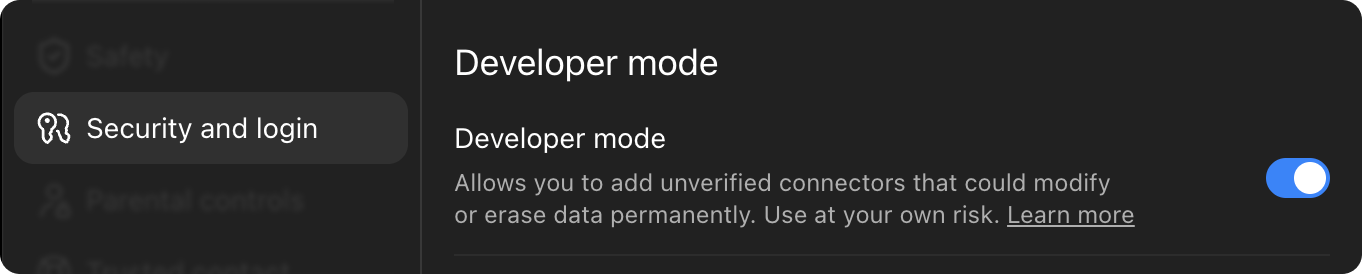
Go to Settings → Security and login, find Developer mode and turn it on.
- Close the settings and open the plugins page: chatgpt.com/plugins
-
Click the + in the top right corner and pick Create plugin. In the open window, click Create MCP application.

-
Paste the address into the field:
https://api-wh.igram.world/instagram/mcp - Choose OAuth for authentication and press Connect (or Sign in).
- A sign-in window appears — log in or register, then confirm access.
- In a chat, open the tools icon and enable iGram. iGram appears in the tools list.


After that, describe the task in plain words. The assistant calls an iGram tool when the request needs one.
Claude on the web
Requirement: a paid Claude plan — Pro, Max, Team or Enterprise.
- Open claude.ai and sign in.
- Click your name in the bottom left corner → Settings → Connectors.
-
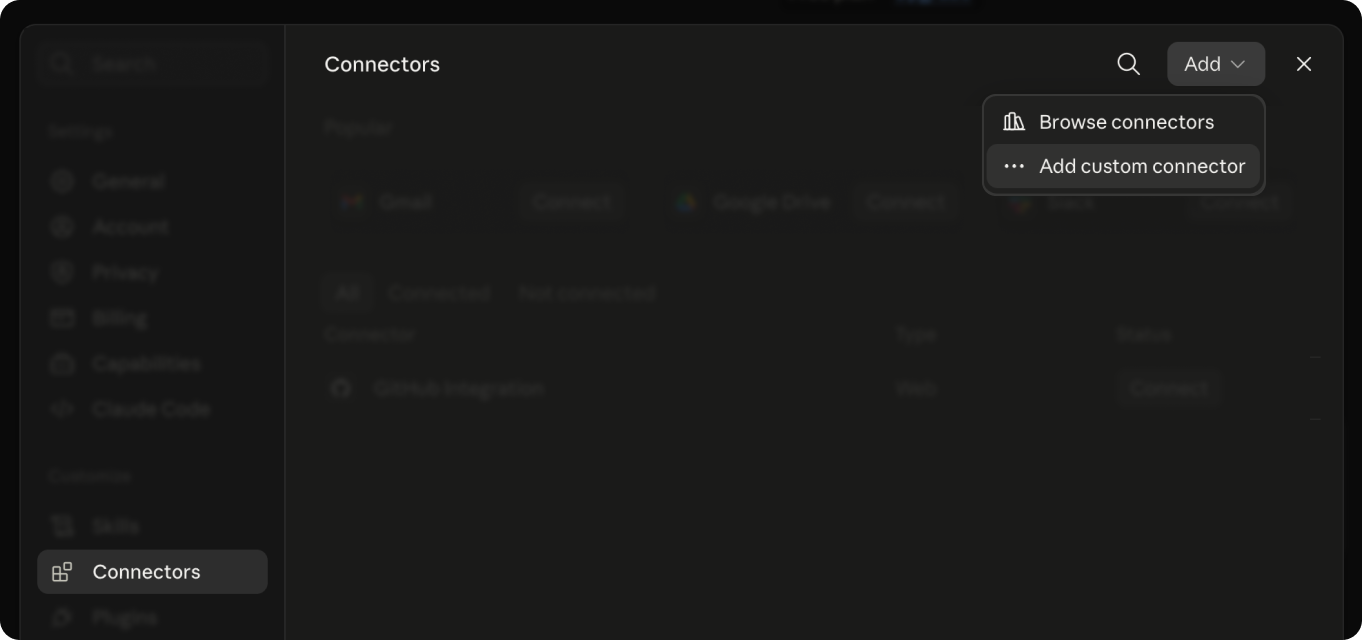
Choose Add custom connector.
-
Paste the address and press Add:
https://api-wh.igram.world/instagram/mcp - Press Connect — a sign-in window appears. Log in or register, then confirm access.
- Back in the chat, open the tools icon under the message box and enable iGram. iGram appears in the tools list.

If the connector is missing, reload the page and check that iGram is enabled in the chat’s tools list.
Claude Desktop
Requirement: a paid Claude plan — Pro, Max, Team or Enterprise. Claude Desktop runs on Windows and macOS.
- Install the Claude app, open it and sign in.
- Go to Settings → Connectors.
-
Choose Add custom connector.
-
Paste the address and press Connect:
https://api-wh.igram.world/instagram/mcp - A browser window opens for sign-in — log in or register, then confirm access.
- Go back to the app. iGram appears in the tools list.
Keep the app updated — custom connectors work only in recent versions.
Claude Code
Requirement: Claude Code installed. The steps run in a terminal, the window where you type commands.
- Install Claude Code and sign in, following the prompts on the first run.
-
Run the add command in the terminal:
claude mcp add --transport http igram-mcp https://api-wh.igram.world/instagram/mcp -
Launch Claude Code and type
/mcp. - Select igram-mcp and press Authenticate — a browser opens for sign-in.
- Log in or register, confirm access and return to the terminal.
-
Type
/mcpagain. The igram-mcp row shows a checkmark.
In the command, igram-mcp is the name of the server in your own list. You can rename it.
If the connection fails
- The sign-in window does not open, or authorization fails. Allow pop-ups in the browser and connect again.
- The tool stopped responding or is missing from the list. Delete the connector and add it again with the same address.
- Claude settings have no Connectors section. Check that your Claude plan is Pro, Max, Team or Enterprise, then update the app or reload the page.
- The session expired. Press Authenticate or Connect again and sign in to iGram.
- 50 free requests
- No card
- Public Instagram data
- 12 tools
Public data or your own account: which Instagram MCP server fits
iGram reads public Instagram data. Servers built on the Instagram Graph API work inside your own Business or Creator account.
| Feature | iGram | Graph API servers |
|---|---|---|
| Whose data | Public accounts | Your Business or Creator account and basic data of other such accounts |
| Instagram login | Not needed | Needed, with a Business or Creator account |
| Meta developer app | Not needed | Needed |
| Own account insights | No | Available through the API |
| Publish posts and reply to DMs | No | Available through Meta's APIs |
| Video files | Direct links, no iGram watermark | Media URLs, not returned for every post |
A Graph API server fits better when an agent has to publish posts, reply to messages or read the insights of your own account.
What the Instagram MCP server cannot do
- Private accounts are not available. iGram fetches only publicly available content, as on the iGram website.
- Expired Stories are not available: a Story disappears after 24 hours unless the author keeps it in Highlights.
- Hashtag pages and tagged posts are not available: the 12 tools do not include them.
- Posts, comments and messages cannot be written: none of the 12 tools publishes posts, writes comments or sends messages.
Instagram MCP server pricing
Every plan includes all 12 tools. Paid plans differ only in the number of requests per month. Each paid plan has a hard monthly cap, with no overage charges.
50 free requests to try the server, no card needed. Start free| Plan | Price | Requests | Start |
|---|---|---|---|
| Free | $0 | 50 free, no card | |
| Pro | $50.00 a month | 50,000 a month | Start with Pro |
| Ultra | $150.00 a month | 250,000 a month | Start with Ultra |
| Mega | $250.00 a month | 1,000,000 a month | Start with Mega |
Read the iGram terms of use.
iGram sends the payment link in the chat where you connected the server. iGram is not affiliated with Instagram or Meta. Several websites and apps use the iGram name but are not run by iGram. The official iGram website is igram.world.
For a custom plan, write to us. For any other question, contact iGram.
Instagram MCP server FAQ
-
MCP stands for Model Context Protocol. It is an open standard for connecting AI assistants to outside services. A service such as iGram runs a server that offers tools. Your assistant acts as the client. It connects to the server and calls a tool when a request needs outside data.
-
The iGram server works with ChatGPT, Claude on the web, Claude Desktop and Claude Code. Other MCP clients connect through their config file, usually mcp.json. ChatGPT needs Developer mode turned on. Custom connectors in Claude need a paid plan.
-
No. The server cannot read private accounts because iGram fetches only publicly available content. The iGram website follows the same rule. All 12 tools work with public accounts and public posts only. The comments, likes and follower lists of a private account are not available either.
-
The iGram Instagram scraper API and this server return the same public Instagram data. The API serves code that you write. Your code decides which call to make. The server serves an AI assistant. The assistant reads a request in plain words and picks the tool itself.
-
No. On November 4, 2026, Meta's list of official MCP servers did not include Instagram. Other developers build such servers for Instagram, and iGram is one of them. iGram is not affiliated with Instagram or Meta. The iGram server reads public Instagram data only.
-
Yes. Meta offers the Instagram Graph API for Business and Creator accounts. The API works inside your own account and needs a Meta developer app. The Basic Display API for personal accounts closed on December 4, 2024. iGram reads public Instagram data without a Meta developer app.
-
No. On the iGram side, the setup asks only for an iGram sign-in in a browser window. It does not ask for an Instagram login or password, or for a Meta developer app. The server reads public Instagram data, so it does not need access to your account.
-
From the chat, iGram receives only what the assistant sends in a tool call. A call holds the tool name and inputs, such as a username or post link. The rest of the chat stays in the client. Sign-in can give iGram your iGram account email, not an Instagram login. The Privacy Policy explains how iGram handles personal data.
-
Yes. A new account gets 50 free requests, and no card is needed. Paid plans start at $50 a month and include all 12 tools. Each paid plan has a hard monthly cap with no overage charges. iGram sends the payment link in the chat where you connected the server.
Connect iGram to your AI assistant
Connect iGram in ChatGPT, Claude or any MCP client. 50 free requests, no card needed.
- Public Instagram data
- 12 tools on every plan
- Video links with no iGram watermark