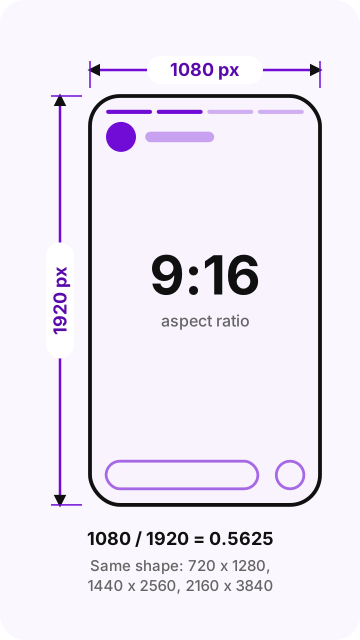
The Instagram story size is 1080 x 1920 pixels, a vertical 9:16 aspect ratio that fills a phone screen edge to edge. The same canvas works for photo and video stories. Keep text and stickers out of roughly the top 250 pixels and the bottom of the frame, where the Instagram interface sits.
Instagram Stories are vertical photos and videos on Instagram, Meta's photo and video app, that disappear after 24 hours. The Instagram story dimensions above are the value guides agree on. For ads in Stories, Meta publishes its own spec: the same 9:16 shape, with 1440 x 2560 pixels recommended.
- Size: 1080 x 1920 px (guides); 1440 x 2560 px recommended for ads (Meta)
- Aspect ratio: 9:16, vertical
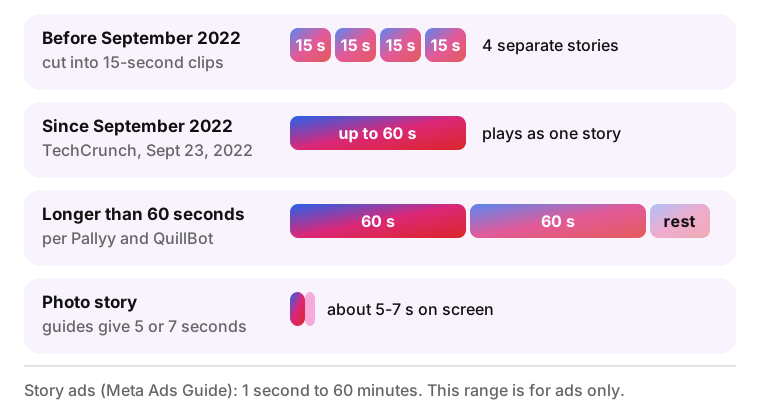
- Video length: Up to 60 seconds per story without being cut into clips
- Files: JPG or PNG up to 30 MB; MP4 or MOV up to 4 GB (Meta, ads)
What size is an Instagram story?
The Instagram story dimensions are 1080 pixels wide by 1920 pixels tall, with a 9:16 aspect ratio. Instagram does not publish a separate spec for regular, non-ad stories. The ad figures in this table come from the Meta Ads Guide for story ads, and the rest are values that current guides agree on, each with its source.
Searches such as "what dimensions are Instagram stories", "ig stories size" or the shorter "ig story dimensions" lead to the same answer: a canvas 1080 pixels wide and 1920 pixels tall. The rows below add the shape, minimum size, formats, length and frame rate.
| Spec | Value | Source |
|---|---|---|
| Dimensions | 1080 x 1920 px for regular stories; 1440 x 2560 px recommended for story ads | Guides: QuillBot (June 29, 2026), PostFast (September 24, 2026), Pallyy (August 4, 2026); ads: Meta Ads Guide |
| Aspect ratio | 9:16, with a 1% tolerance for ads | Meta Ads Guide |
| Minimum size | Sources differ: Meta asks for a width of at least 500 px for image ads and 250 px for video ads; PostFast lists 600 x 1067 px | Meta Ads Guide; PostFast |
| Photo formats | JPG or PNG, up to 30 MB | Meta Ads Guide; the same 30 MB in QuillBot and ShortGenius |
| Video formats | MP4 or MOV (Meta also accepts GIF for ads), up to 4 GB | Meta Ads Guide |
| Video length | Up to 60 seconds per story without being split into clips | Meta spokesperson via TechCrunch, September 23, 2022 |
| Photo duration | Sources differ: about 5 seconds or 7 seconds | 5 s: Pallyy, Taplink; 7 s: QuillBot |
| Frame rate | 30 fps playback, according to guides; Meta gives no number | QuillBot, Pallyy |
Instagram story aspect ratio
The Instagram story aspect ratio is 9:16: 9 units of width for every 16 units of height. An aspect ratio describes the shape of a frame as width:height, not its size, so 9:16 tells you the canvas is tall and narrow. A 1080 x 1920 story is a 1080p frame turned on its side.
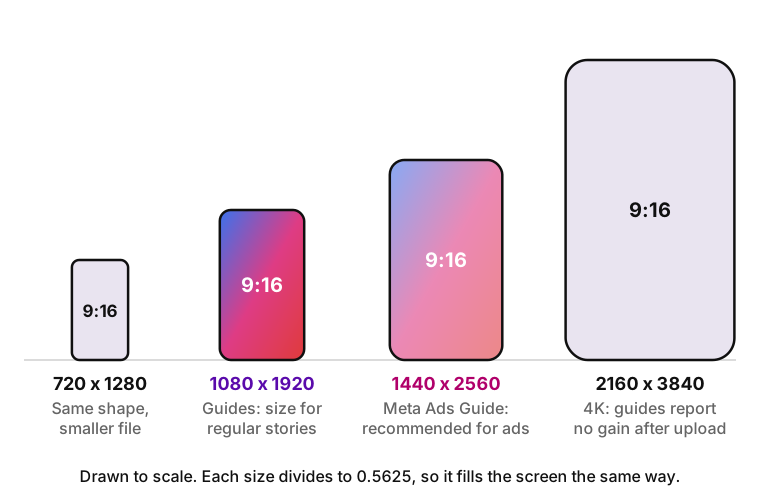
Any resolution in the same 9:16 shape fills the screen the same way. Common examples are 720 x 1280, 1080 x 1920, 1440 x 2560 and 2160 x 3840 pixels. Of these, 1440 x 2560 is the size Meta recommends for story ads, while 1080 x 1920 is the size most guides give for regular stories.
A quick way to check whether a file is 9:16 is to divide its width by its height. The result for 9:16 is 0.5625: 1080 / 1920, 720 / 1280 and 1440 / 2560 all give that number. A file that gives 0.75 is 3:4, 0.8 is 4:5 and 1.0 is square, and none of them fill a story without borders.
The Instagram story ratio is often confused with 16:9. The 16:9 ratio is the horizontal TV and YouTube format, 1920 pixels wide by 1080 tall. A 16:9 file uploaded to Stories does not fill the frame, because it has the right numbers in the wrong order.
The vertical shape goes back to the launch of the format. Instagram introduced Stories on August 2, 2016, describing photos and videos that "appear together in a slideshow format" and "disappear after 24 hours and won't appear on your profile grid or in feed." A story is watched on a phone held upright, so the canvas copies the shape of the screen instead of the square or 4:5 shape of the feed.
The audience for that shape grew fast. On Facebook's earnings call for the fourth quarter of 2018, Mark Zuckerberg said Stories had reached 500 million daily users, up from 400 million in June 2018, as TheWrap reported on January 30, 2019. Some size guides date the 500 million mark to the end of 2017, which does not match that report.
Instagram story resolution and 4K
Uploading at a resolution above 1080 pixels wide brings little benefit, according to the guides that tested it. Pallyy (August 4, 2026) says Instagram stores stories at 1080 pixels wide and compresses wider files down. PostFast says a 4K upload gives no real advantage and can look worse after compression. Meta has not confirmed either claim, so treat them as guide findings.
The practical takeaway is to shoot at whatever resolution your camera handles well, including 4K, and export the final story at 1080 x 1920. ShortGenius gives the same advice for export. A 1080 x 1920 file is what Instagram serves anyway, and you decide how it gets scaled instead of leaving that to the app.
Story ads are the exception. The Meta Ads Guide recommends 1440 x 2560 pixels for story ads, so exporting an ad creative above 1080 x 1920 follows an official recommendation rather than a guess. For regular stories, Meta gives no resolution at all.
Instagram story safe zones
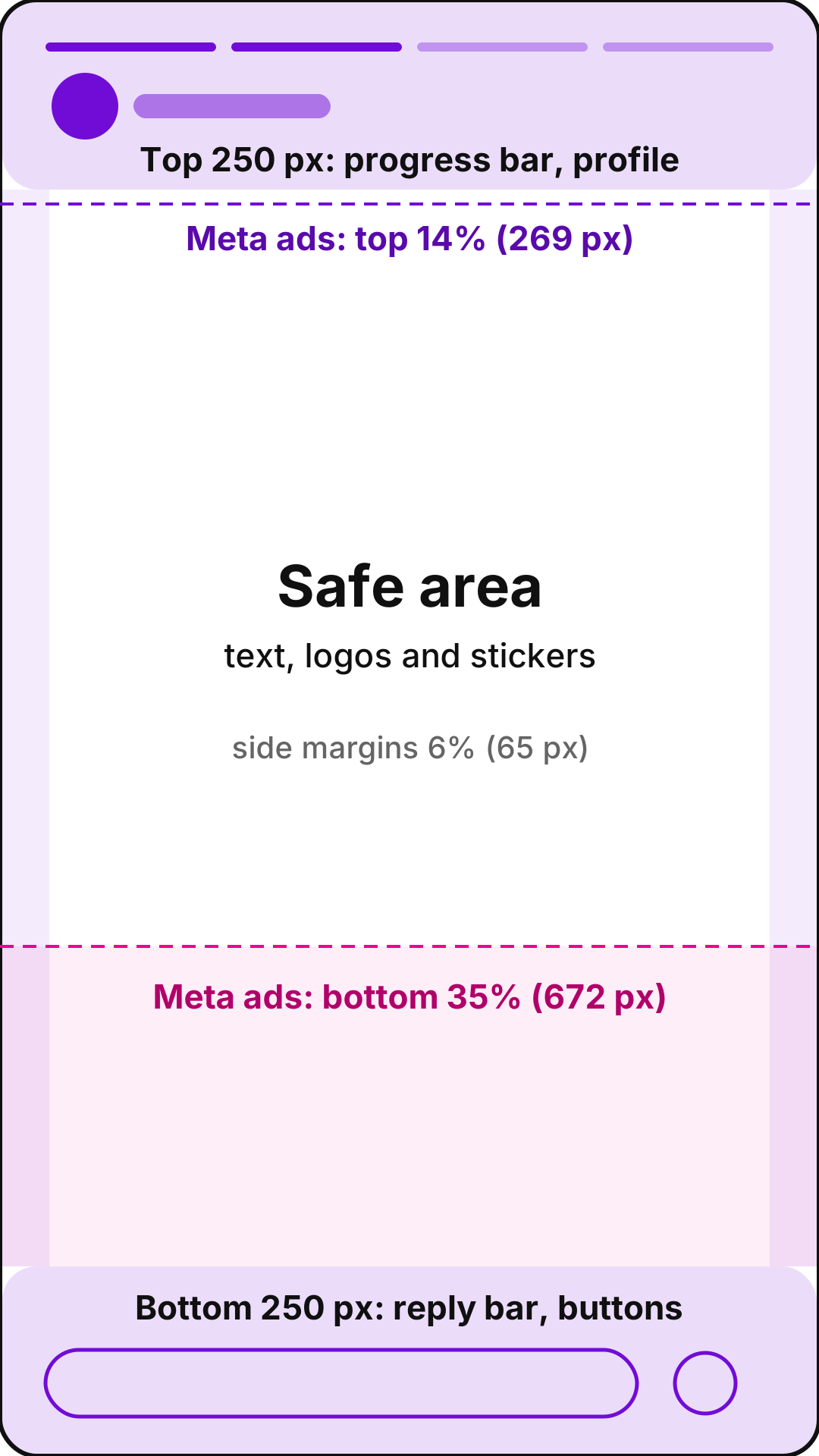
The Instagram story safe zone is the middle of the 1080 x 1920 frame that the Instagram interface does not cover: the profile picture, username and progress bar at the top, and the reply bar and buttons at the bottom. Text, logos, polls and other stickers placed outside it can be cut off. Sources give different numbers for the bottom margin, as the table shows.
| Source | Top | Bottom | Sides | Date |
|---|---|---|---|---|
| Meta Ads Guide (story ads) | 14% (about 269 px of 1920) | 35% (about 672 px) | 6% (about 65 px of 1080) | Current ad spec |
| QuillBot, ShortGenius, NapoleonCat | 250 px | 250 px | None; NapoleonCat adds 30 px | June 29, 2026; February 1, 2026; April 15, 2025 |
| Pallyy | About 250 px | About 310 px | Not given | August 4, 2026 |
| PostFast | About 250 px | About 350 px | Not given | September 24, 2026 |
How the safe zone maps onto the frame
A safe zone diagram for a 1080 x 1920 story has three bands. The top band, about 250 pixels tall in guides and 14% in Meta's ad spec, holds the progress bar, profile picture and username. The bottom band holds the reply bar and share buttons and ranges from 250 pixels to 35% of the height. Thin side margins, 6% in Meta's spec, keep text away from the screen edges.
The pixel values for Meta in the table are calculated from its percentages: 1920 x 0.14 for the top, 1920 x 0.35 for the bottom and 1080 x 0.06 for each side. Meta publishes percentages, not pixels, so the same rule scales to 1440 x 2560 or any other 9:16 file.
For a regular story, a safe default is to keep important content at least 250 pixels from the top and bottom of a standard 1080 x 1920 frame. If the story has a link sticker or a call to action near the bottom, use the larger bottom margin from Meta (35%). Instagram has not published an official safe zone for organic stories, so this is a working rule, not a spec.
Safe zones are approximate. The exact space the interface covers depends on the phone, the screen shape and the app version, so no margin guarantees that an element stays visible. Check the preview in the story editor before posting anything with small text near the edges. The report below shows how this looks on specific phones.
Interactive elements need the safe zone most. A poll, a question box or a link sticker placed under the username or next to the reply bar can end up partly covered, and ShortGenius warns that a covered sticker may become impossible to tap. A sticker that viewers cannot tap collects no votes, answers or clicks, so keep it inside the safe area with the same margins as text.
Captions burned into a video follow the same rule. Subtitles set at the very bottom of the frame end up behind the message bar, so lift them above the bottom band, roughly 250 to 350 pixels from the bottom edge on a 1080 x 1920 canvas.
However with Samsung phones (namely A and J series), it zooms in on the image and cuts it making it not fit the post on some devices , while looking okay on others.
Safe zone for Instagram story ads
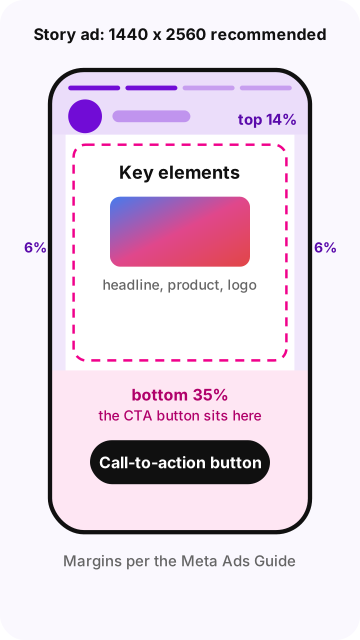
Story ads need a larger bottom margin than regular stories because Instagram adds a call-to-action button at the bottom of the ad. The Meta Ads Guide for Stories image and video ads says to keep key elements out of the top 14%, the bottom 35% and 6% on the left and right, so that profile icons and the CTA do not cover them.
Story ads use the same 9:16 shape as a regular story, with 1440 x 2560 pixels recommended by Meta. A design built at 1080 x 1920 with Meta's percentage margins also works for ads, since the percentages scale with the frame.
How long can an Instagram story be?
A story video can play continuously for up to 60 seconds. A photo story stays on screen for a few seconds, and every story disappears after 24 hours unless you add it to Highlights on your profile.
Video length and the old 15-second limit
Since September 2022, story videos up to 60 seconds long play as one story instead of being cut into 15-second clips. A Meta spokesperson told TechCrunch on September 23, 2022 that people "will be able to play and create Stories continuously for up to 60 seconds." The 15-second limit that many older guides still mention is outdated.
Videos longer than 60 seconds are split into 60-second segments, each shown as its own story, according to Pallyy (August 4, 2026) and QuillBot (June 29, 2026). Some guides still describe 15-second segments. Check the result in the story editor before posting a long clip, because this behavior has changed before.
The Meta Ads Guide lists a video length of 1 second to 60 minutes for story ads. That range applies to ads only. It is not the limit for a regular story posted from the app.
How long a photo stays on screen
A photo story stays on screen for about 5 seconds according to Pallyy and Taplink, while QuillBot gives 7 seconds. Instagram has not published the number, so expect a photo to stay on screen for roughly 5 to 7 seconds unless the viewer taps forward or holds the screen.
This short display time matters for design. A photo story with a paragraph of text gives viewers only a few seconds to read it, so keep the copy short or split it across two or three stories.
Instagram story file size and formats
The file limits Meta publishes for Stories come from its ad specs, and guides repeat the same numbers for regular stories. Exporting at the Instagram story size in pixels, 1080 x 1920, keeps files well under these limits.
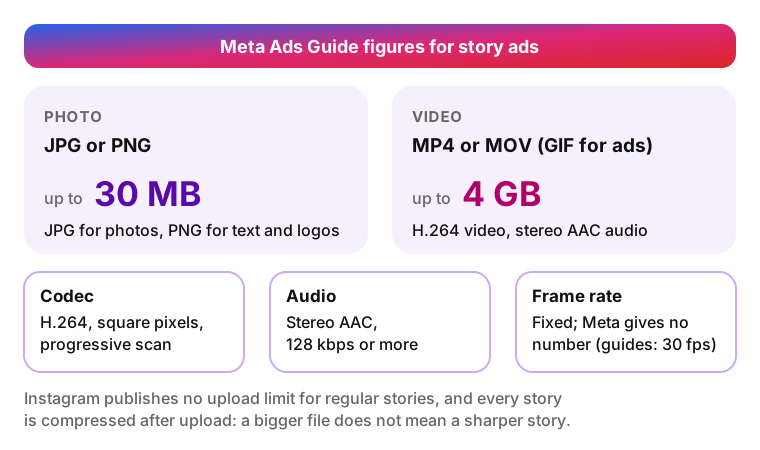
- Photo. JPG (JPEG) or PNG, up to 30 MB (Meta Ads Guide). JPG suits photos; PNG keeps text, logos and flat graphics crisp.
- Video. MP4 video or MOV (QuickTime), up to 4 GB (Meta Ads Guide). Meta also accepts GIF for story ads.
- Video codec and audio. H.264 (AVC) video with square pixels, a fixed frame rate and progressive scan; stereo AAC audio at 128 kbps or more (Meta Ads Guide, video settings).
- Frame rate. Meta asks for a fixed frame rate but gives no number. QuillBot and Pallyy say stories play back at 30 fps, and QuillBot adds that 24 to 60 fps uploads are supported.
- Export settings. Export at exactly 1080 x 1920 px, 9:16, as an H.264 MP4. ShortGenius and PostFast give this same advice. Editors such as Premiere Pro, Final Cut Pro and Canva can all export this format; per-editor bitrate recipes in other guides have no published source, so they are not repeated here.
The 30 MB and 4 GB limits are published for ads. Instagram does not publish an upload limit for regular stories, and the app compresses every story after upload, so a large file does not mean a sharper story.
How to fit photos and videos that aren't 9:16
The Instagram story photo size that fills the screen is 1080 x 1920 pixels, and any image with a different shape gets borders or a crop. The same applies to graphics and screenshots. Resizing the file before upload gives you control over what gets cut.
What Instagram does with other ratios
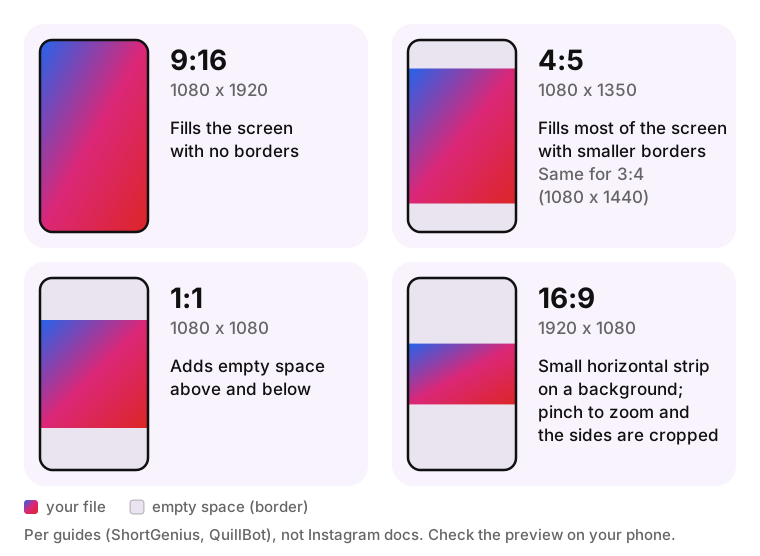
The behavior in this table comes from guides (ShortGenius, QuillBot) rather than Instagram documentation, and the story editor can change between app versions. Check the preview on your own phone before posting.
| Your file | What Instagram does | Fix |
|---|---|---|
| Landscape 16:9 (1920 x 1080) | Shows a small horizontal strip on a background, or crops the sides if you pinch to zoom | Place it on a 1080 x 1920 background or recut the video vertically |
| Square 1:1 (1080 x 1080) | Adds empty space above and below | Add a background, text or a second image in the free space |
| Portrait 4:5 (1080 x 1350) or 3:4 (1080 x 1440) | Fills most of the screen with smaller borders | Extend the background to 1080 x 1920 or crop slightly |
Resize an image to 1080 x 1920 in Canva
Button names in Canva change over time, so the labels may differ slightly from these steps.
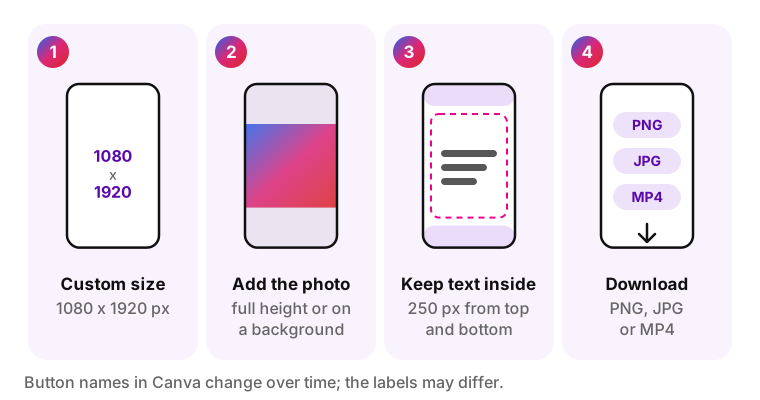
- Create a design with a custom size of 1080 x 1920 px.
- Add your photo and stretch it to the full height, or place it on a colored or blurred background.
- Keep text and stickers inside the safe zone: at least 250 px from the top and bottom.
- Download as PNG for graphics with text, JPG for photos, or MP4 for video.
Horizontal video in a vertical story
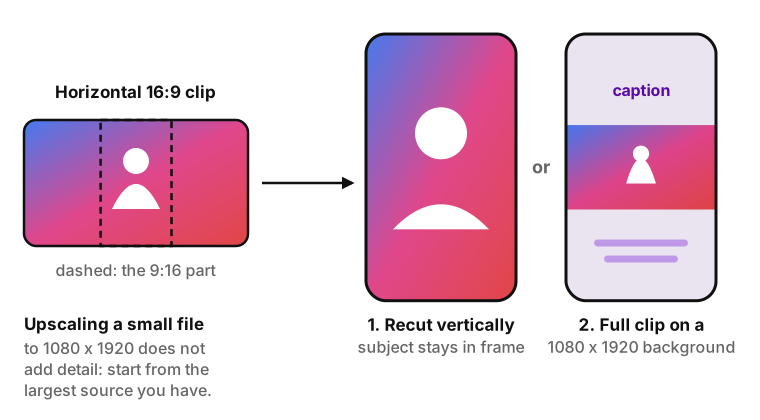
A horizontal video has two honest options in Stories. Recut it vertically in an editor so the subject stays in the 9:16 frame, or place the full 16:9 clip on a 1080 x 1920 background with space above and below for a caption.
Upscaling has a limit. Stretching a small or low-resolution file to 1080 x 1920 does not add detail; it enlarges the pixels, and the story looks soft or pixelated. Start from the largest source you have.
Why your Instagram story looks blurry or cropped
The answer to "why is my Instagram story blurry" is usually one of six causes: the file size, the shape, the placement of text, the export, an app setting or repeated compression. Each cause below has a check and a fix.
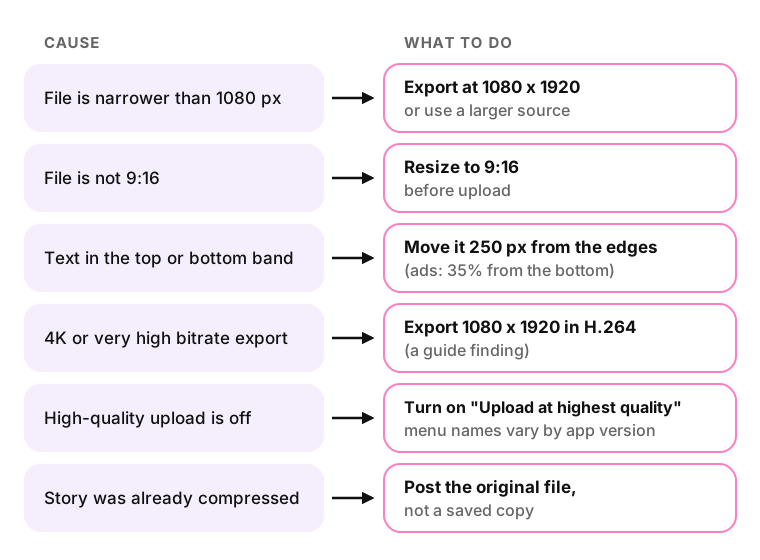
- The file is narrower than 1080 px. Check the width in the file info. Instagram stretches it to fill the screen, which makes it soft. Export at 1080 x 1920 or start from a larger source.
- The file is not 9:16. Compare the shape with the table of other ratios above. Instagram adds borders or crops it. Resize to 9:16 before upload; one user's comparison is quoted below.
- Text sits in the top or bottom band. Open the preview and look for text under the username or the reply bar. Move it at least 250 px from the top and bottom, or 35% from the bottom for ads.
- The export is 4K or very high bitrate. Check the export preset. Guides (PostFast, Pallyy) report that Instagram compresses large files harder; Meta has not confirmed this. Export at 1080 x 1920 in H.264.
- High-quality upload is turned off. Instagram's settings include an "Upload at highest quality" option in the data and media quality settings; the menu name varies by app version. Turn it on before uploading over Wi-Fi.
- The story was already compressed. A story saved from Instagram and posted again goes through compression twice. Post the original file from your camera roll or editor instead.
I compared a resize app (only apps on phones) and uploaded the pictures in 1080x1920 vs IG APP auto-uploading and the pictures are already way better.
A blurry story is not always a file problem. On a slow connection, the viewer's app can show a lower-quality version of the story, which is not a size error. If the story fails to post at all, see Instagram story not uploading for fixes.
Instagram story vs post vs Reels sizes
The Instagram story post size, 1080 x 1920 at 9:16, is shared with Reels but not with feed posts. The table gives the main formats in one place; this article stays focused on Stories.
| Format | Size | Ratio | Source |
|---|---|---|---|
| Story | 1080 x 1920 px | 9:16 | Guides; Meta Ads Guide for ads |
| Reels | 1080 x 1920 px | 9:16 | Figma, PostFast |
| Feed post, portrait | 1080 x 1350 px | 4:5 | Figma |
| Feed post, square | 1080 x 1080 px | 1:1 | Figma |
| Feed post, landscape | 1080 x 566 px | 1.91:1 | Figma |
| Profile grid preview | 1080 x 1440 px | 3:4 | Change announced by Instagram head Adam Mosseri in January 2025, as reported in the press |
| Highlight cover | 1080 x 1920 px canvas; only the round center shows on the profile | 9:16 | Pallyy (August 4, 2026) |
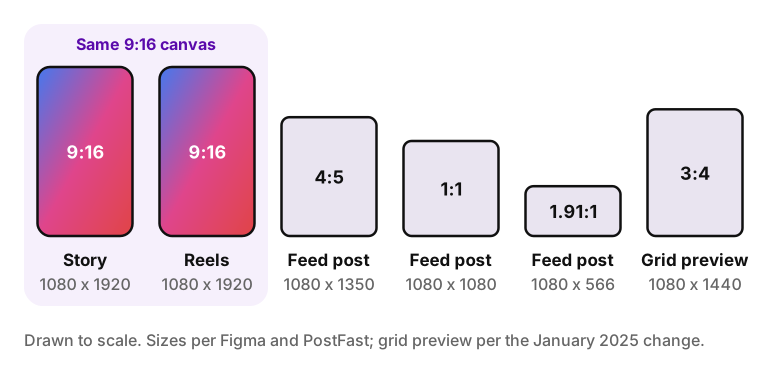
Reels use the same canvas as Stories but have their own interface overlays and a separate cover image, so a story design may need small changes before it works as a Reel. The differences between the two formats, beyond size, are covered in Instagram Reels vs Stories. To save a Reel as an MP4, use the Instagram Reels downloader.
A highlight cover is built on the same 1080 x 1920 canvas, but the profile shows only a circle cut from its center, so keep the icon or word in the middle. Highlights themselves can be saved one at a time from a public profile: iGram has a separate page to download Instagram highlights.
Instagram story size FAQ
-
The IG story ratio is 9:16, or 9 units wide for every 16 units tall, such as 1080 x 1920 pixels. It is the vertical shape of a phone screen. Do not confuse it with 16:9, the horizontal TV format, which shows up in Stories as a small strip with empty space around it.
-
Yes, Stories accept 4K video, but guides report it is shown at about 1080 pixels wide after compression; Meta has not confirmed the exact number. A 4K upload adds file size without adding visible detail. For the sharpest result you control, export the story at 1080 x 1920 in H.264 MP4.
-
A story has no fixed size in inches, because digital images are measured in pixels and inches depend on pixel density (PPI). At 72 PPI, a 1080 x 1920 story equals 15 x 26.67 inches; at 96 PPI, it equals 11.25 x 20 inches. For design work, set the canvas in pixels.
-
Story ads use the same 9:16 shape as regular stories, but Meta recommends 1440 x 2560 pixels and wider margins. The Meta Ads Guide says to keep key elements out of the top 14%, the bottom 35% and 6% on each side, because the ad adds a call-to-action button at the bottom.
-
Instagram crops a story when the file is not 9:16 or when you pinch to zoom in the editor. Phones with screens taller than 9:16 can also trim the edges of a 1080 x 1920 frame, and the exact amount varies by device. Resize the file to 9:16 and keep key content inside the safe zone.
-
Yes, Instagram compresses every story after upload, so the posted version is smaller than your original file. To reduce visible loss, export at 1080 x 1920 in H.264, avoid re-uploading a story you saved from Instagram, and turn on the "Upload at highest quality" option in the app's data and media settings.
-
Your own story can be saved from the story menu in the Instagram app. For public accounts, iGram Story Saver saves stories as MP4 or JPG from the profile link. Free downloads are standard quality, not HD; HD and 4K are available in Premium. Stories from private accounts cannot be saved.
Sources
- Meta Ads Guide: Stories image ad specs
- Meta Ads Guide: Stories video ad specs
- TechCrunch, September 23, 2022: 60-second stories are no longer broken up into clips
- Figma: Guide to Instagram image sizes and dimensions
- Pallyy: story size guide, updated August 4, 2026
- QuillBot: story size guide, June 29, 2026
- PostFast: story size guide, updated September 24, 2026
- ShortGenius: story size guide, February 1, 2026
- NapoleonCat: story size guide, updated April 15, 2025
- Taplink: story size guide