Instagram Reels vs Stories: What's the Difference?

Instagram reels vs story comes down to lifespan and audience. A story is a photo or a video clip of up to 60 seconds that disappears after 24 hours and is shown mainly to your followers. A reel is a video of up to 20 minutes that stays on your profile and can be recommended to people who don't follow you.

Both formats belong to Instagram, the photo and video app owned by Meta, and both fill the phone screen vertically. Every spec here was checked against the Instagram Help Center in October 2026.

  • Length: Up to 60 seconds per clip vs up to 20 minutes
  • Lifespan: 24 hours (unless added to Highlights) vs until you delete or archive it
  • Recommended to new audiences: Only videos of 3 minutes or less

Instagram Reels vs Story compared side by side

Each instagram story vs reel value in this table comes from Instagram's own help and feature pages.

Instagram Reels vs Stories: specs as of October 2026
Feature Story Reel
Format Photo or video Vertical video made of one or more clips
Length Up to 60 seconds per video clip Up to 20 minutes; anything over 3 minutes isn't recommended to new audiences
How long it stays 24 hours, unless you add it to Highlights On your profile until you delete or archive it
Where people see it The row at the top of Feed and your profile photo Feed, the Reels viewer, Explore, and audio, effect and hashtag pages
Who it's shown to Mostly people who follow you; can be limited to Close Friends Mostly people who don't follow you
Who watched A viewer list that only you can see A view count and a Viewers total in insights
Music Music sticker Instagram's audio library, your own audio or another creator's original audio
Interaction Replies in Direct; poll, question, quiz and link stickers Likes, comments, shares, saves and Remix
Archive and Highlights Saved to your private archive (can be turned off); can be pinned to Highlights Stays on the profile; can be archived
Metrics Views, Viewers, Interactions, Accounts engaged, Profile activity; available for up to 2 years Views, Viewers, Watch time, Average watch time, Follows
Screen Vertical, full screen Vertical, full screen

On a private account, both formats are visible only to followers you have approved. Exact pixel dimensions for both are covered in our guide to Instagram story size.

Difference between Instagram Story and Reel, point by point

The table lists the specs; the points below explain what the difference between a reel and a story means in practice.

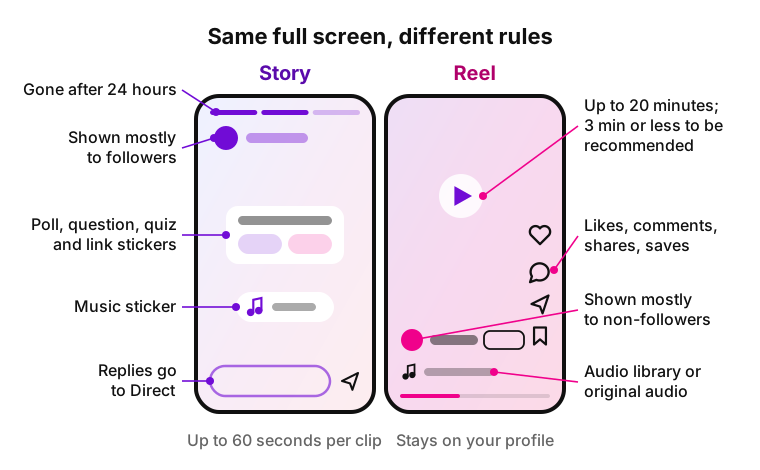
Instagram reels vs story frames side by side: the story frame has a progress bar, poll and music stickers and a reply field to Direct, and disappears after 24 hours; the reel frame has like, comment, share and save icons and an audio line, runs up to 20 minutes and stays on the profile. Answers what are Instagram reels compared with stories.
Illustration: both formats side by side, with the key differences labeled on each frame.

How long a reel or a story can be

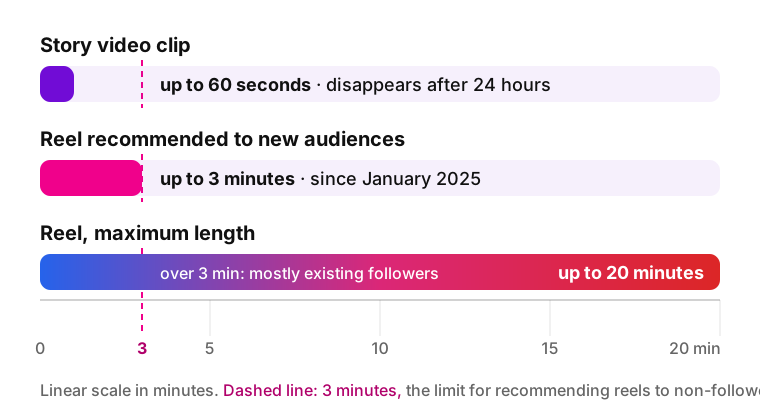
A story video clip can run up to 60 seconds, while a reel can combine clips into a video of up to 20 minutes. The catch: Instagram doesn't recommend anything longer than 3 minutes to new audiences, so a 10-minute video mostly reaches existing followers.

The 3-minute mark dates from January 2025, when Adam Mosseri, head of Instagram, announced it.

Bar chart on a linear scale in minutes: a story video clip runs up to 60 seconds, a reel recommended to new audiences runs up to 3 minutes (since January 2025), and a reel can run up to 20 minutes, though reels over 3 minutes mostly reach existing followers.
Clip lengths on one scale: 60 seconds, 3 minutes for recommendations, 20 minutes maximum.

How long they stay on your profile

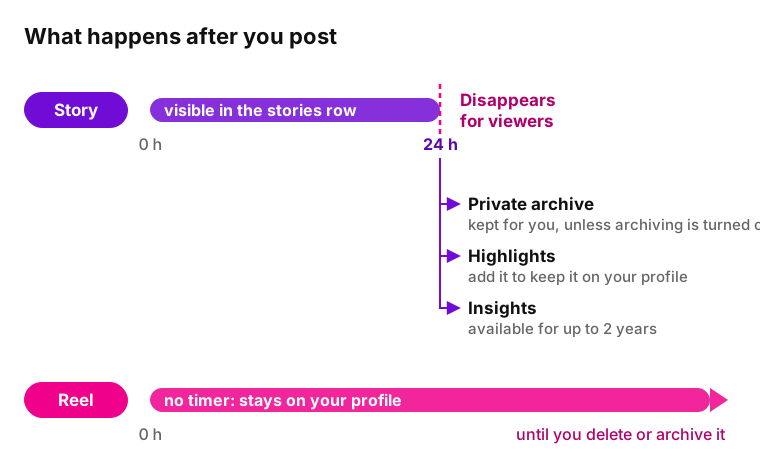
A story disappears from the row at the top of Feed, your profile and Direct 24 hours after you post it, unless you add it to Highlights. A reel has no timer: it stays on your profile until you delete or archive it.

Timeline of a key difference between reel and story: an Instagram story is visible for 24 hours, then disappears for viewers and goes to the private archive, can be added to Highlights, and keeps its insights for up to 2 years; a reel has no timer and stays on the profile until deleted or archived.
Illustration: the 24-hour clock, then the archive, Highlights and insights; no timer for the other format.

Who sees them: followers or new audiences

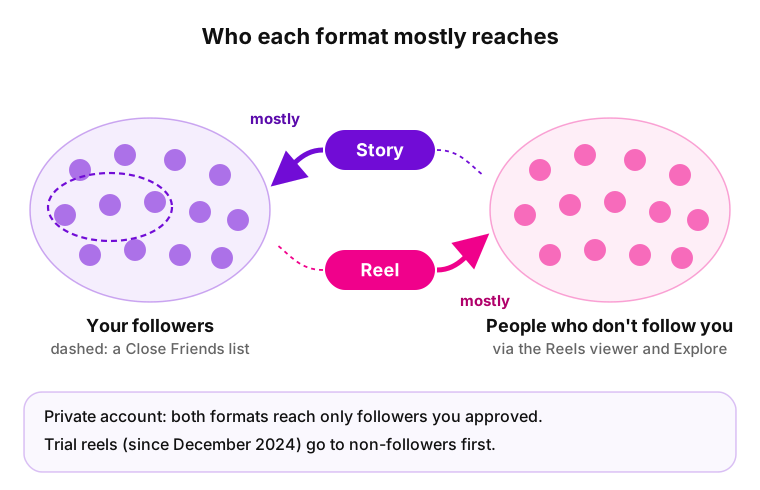
Stories mostly reach followers; reels, Instagram's answer to TikTok-style short-form video, mostly reach new people. In "Instagram Ranking Explained" (May 31, 2023), Instagram says the row at the top of Feed is filled from accounts you chose to follow, plus ads, while in Reels the majority of what you see comes from accounts you don't follow.

Socialinsider, in a study updated September 30, 2026, reports that reels average about double the video view rate of stories.

Diagram: Instagram stories go mostly to your followers, with an optional Close Friends list; reels go mostly to people who don't follow you through the Reels viewer and Explore; on a private account both reach only approved followers; trial reels go to non-followers first.
Illustration: where each format mostly goes, to followers or to people who don't follow you.

Viewer list vs view count

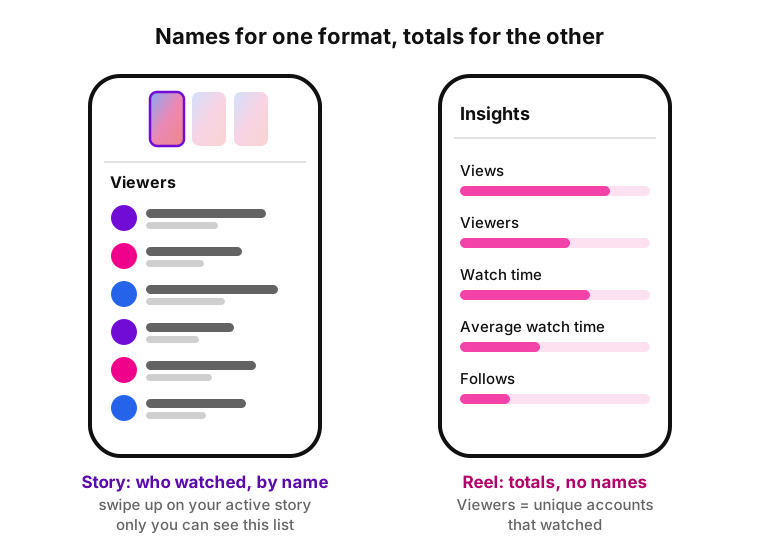
Swipe up on your own active story to see the list of accounts that watched it; only you can see that list. Instagram's help pages describe reels differently, as totals: a view count and a Viewers metric, the number of unique accounts that watched.

That matters for privacy: watching someone's 24-hour post puts your account on a list they can open, while Instagram documents no named viewer list for reels. For how that list is sorted, see our guide on who viewed your story and in what order.

Two phone screens: an Instagram story viewer list with accounts by name, visible only to the creator after a swipe up; reel insights with Views, Viewers, Watch time, Average watch time and Follows as totals without names.
Illustration: a named viewer list on the left, totals in insights on the right.

Music and audio

Stories get music through the music sticker. Reels draw on more sources: Instagram's audio library, audio you record yourself, or another creator's original audio, which is how trending audio spreads.

The Instagram Help Center says licensed music may be unavailable for some account types, including some business accounts, and in some regions. A boosted video can't use licensed music at all.

Interaction and metrics

Story interaction is private: replies go to your Direct messages, stickers add polls, questions and quizzes, and eligible accounts can add a link sticker. Reel interaction is public: likes, comments, shares, saves and Remix, which lets others record a video next to yours.

The metrics follow the same split. Insights for the 24-hour format show Views, Viewers, Interactions, Accounts engaged and Profile activity, and they stay available for up to 2 years. Reel insights add Watch time, Average watch time and Follows. Each metric is explained in our guide to Instagram story analytics.

When to post a reel vs a story

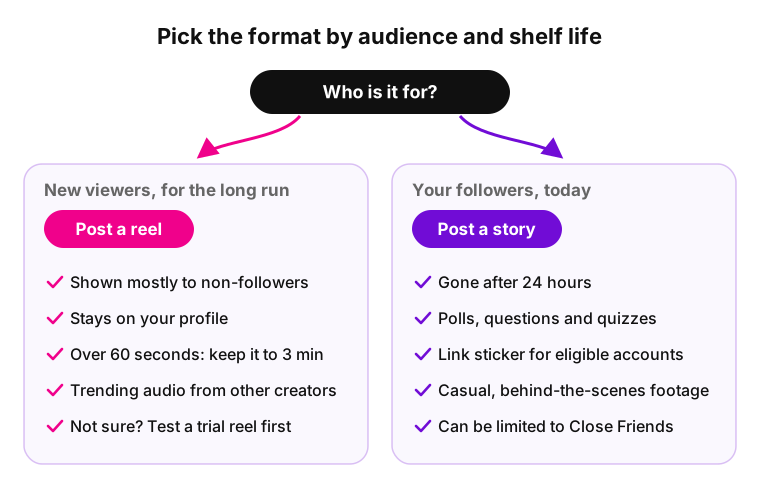
Post a reel when you want people who don't follow you to find it, and a story when the message is for followers and only matters today.

Decision chart for when to post an Instagram reel vs a story: for new viewers and content that should keep working, post a reel; for followers and updates that matter today, post a story.
Two questions decide the format: who it is for and how long it should stay.

Post a reel when you want new viewers

  • You want new people to find you: this format goes mostly to non-followers.
  • The content should keep working: it stays on your profile.
  • A tutorial or review runs past 60 seconds: up to 20 minutes fits, and 3 minutes or less keeps it recommendable.
  • You want a trending sound: other creators' original audio is open to you.
  • You want to test an idea first: Instagram's trial option shows it to non-followers before followers.

Post a story when it matters today

  • An event, sale or update matters for a day: it disappears after 24 hours.
  • You want answers from followers: poll, question and quiz stickers collect them.
  • You want to send people to a website: eligible accounts can add a link sticker.
  • The footage is casual or behind-the-scenes and shouldn't stay on your profile.
  • The update is only for a small group: you can limit it to Close Friends.

Instagram post vs story vs reel

A post is the permanent part of your profile grid, a reel is built for discovery, and a story is a 24-hour update for followers. Posts appear in your followers' Feed and can also be recommended to non-followers, so the instagram reel vs post choice mostly comes down to format: photos and carousels suit a post, vertical video suits the other.

Instagram post vs story vs reel at a glance
Post Story Reel
What it is A photo or a carousel of up to 20 photos and videos A photo or a video clip of up to 60 seconds A vertical video of up to 20 minutes
Lifespan On your profile grid until you delete or archive it 24 hours, unless added to Highlights On your profile until you delete or archive it
Where it shows Feed of followers; can be recommended to others The row at the top of Feed and your profile photo Explore page, Feed, audio and hashtag pages
Best for Photo sets and lasting announcements Today's updates and questions to followers Reaching people who don't follow you
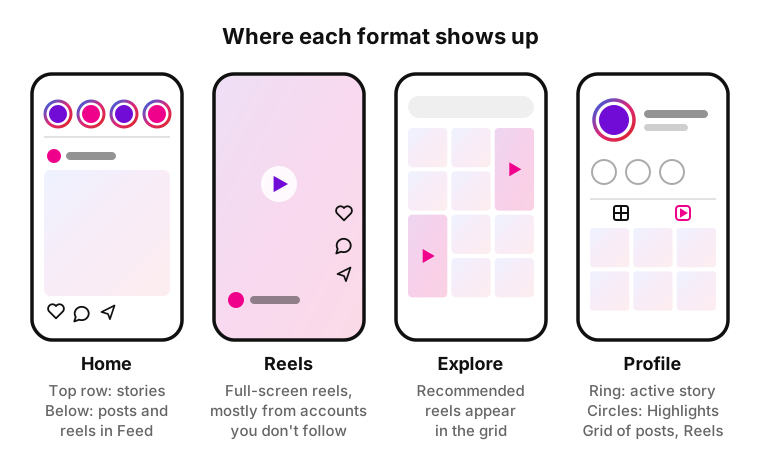
Four simplified Instagram screens: Home with the stories row on top and a feed post below, the full-screen Reels viewer, the Explore grid with recommended reels, and a profile with a ring around the photo for an active story, Highlights circles, the posts grid and the Reels section.
Illustration: where each format shows up in the app.

How to use reels and stories together

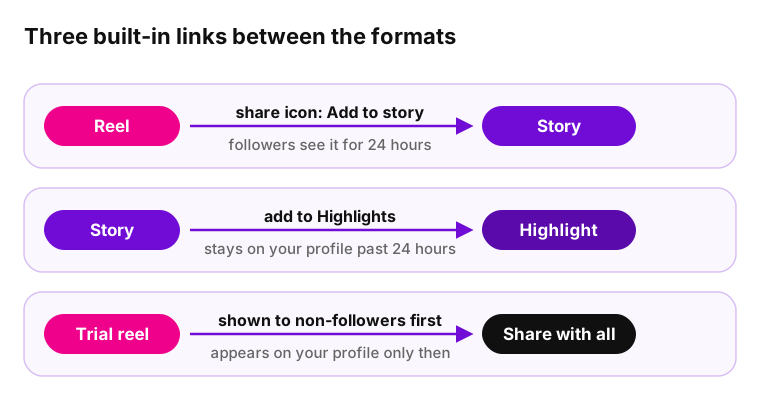
The reel vs story Instagram choice isn't either-or. Three built-in mechanics connect the formats:

Three flows between Instagram formats: share a reel to your story with the share icon, add a story to Highlights so it stays on the profile past 24 hours, and post a trial reel to non-followers first before sharing it with everyone.
Illustration: share to followers, pin to Highlights, test with non-followers first.
  • Share a reel to your story. Tap the share icon and add it there, so followers see a video that went mostly to new viewers. Watch the shared version once after posting to see how much of it plays.
  • Keep it with Highlights. Anything that should outlive 24 hours, such as prices, a menu or answers to common questions, can be pinned to Highlights on your profile.
  • Test, then publish. A trial reel is shown to non-followers first and doesn't appear on your profile until you choose to share it with everyone.

Whenever I share reels on my stories it's either 15 seconds or up to 60 seconds. I much prefer the 60 seconds, but suddenly it's gone.

u/TheRealMateoA, r/Instagram on Reddit,

How to save a reel or a story

To keep a copy, save a 24-hour post before it expires and a video while it is still public: paste the link into an online saver and download the file. Instagram's own Save button keeps the video in the app, not on your device.

iGram, an online tool not affiliated with Instagram or Meta, handles both formats for public accounts only; private accounts aren't supported. Free downloads are in standard quality with no limit; HD, 4K and MP3 need Premium. iGram doesn't store links or files, and the author isn't notified. Save other people's content for personal viewing only: the rights stay with the author.

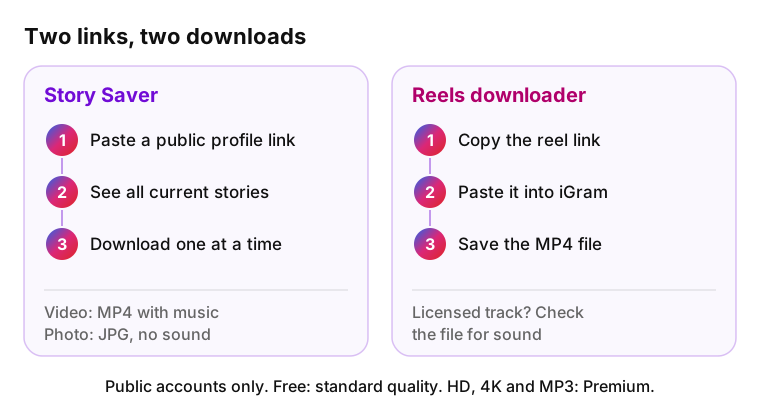
How to save an Instagram story with the iGram Story Saver from a public profile link, downloading current stories one at a time as MP4 with music or JPG, and how to download a reel as MP4 with the Reels downloader.
Illustration: a profile link for current posts, a video link for one MP4.

Save Instagram stories before they expire

Paste a public profile link into iGram to save Instagram stories: the tool shows everything that account has posted in the last 24 hours, and you download items one at a time. Videos are saved as MP4 with their music and stickers; photos are saved as JPG, without sound. Highlights also download one at a time, with their publication date.

Download Instagram reels as MP4

To download Instagram reels, paste the video link into the iGram downloader and save the MP4 file. When you download your own video from Instagram itself, music from the audio library isn't saved. iGram confirms music only for video stories, so if the clip uses a licensed track, check the downloaded file for sound.

For other video formats, see our guide on how to download a video from Instagram.

Common mistakes when comparing reels and stories

Outdated limits are the most common error, even in guides updated in 2026.

  • "Stories are 15 seconds." A video clip can now run up to 60 seconds.
  • "Reels max out at 90 seconds." The limit is 20 minutes; only videos of 3 minutes or less are recommended to new audiences.
  • "Any song works in a boosted reel." Licensed music from Instagram's library isn't available once you boost.
  • "An expired story is gone." Viewers lose it, but the creator keeps it in a private archive (unless turned off), can add it to Highlights and sees its insights for up to 2 years.

Instagram Reels vs Stories FAQ

  • Both are full-screen vertical formats. A reel is a video of up to 20 minutes that stays on your profile and can be recommended to people who don't follow you. A story is a photo or a clip of up to 60 seconds that disappears after 24 hours.

  • Post a reel to reach people who don't follow you: Instagram mostly shows it to non-followers and keeps it on your profile. Post a story for followers and for anything that only matters today, such as a sale, a poll or a quick update.

  • A story stays visible for 24 hours, then disappears from the row at the top of Feed and from your profile. It remains in your private archive and can be added to Highlights. A reel has no expiry: it stays on your profile until you delete or archive it.

  • A story video clip can be up to 60 seconds long. A reel can be up to 20 minutes, but Instagram doesn't recommend anything longer than 3 minutes to new audiences. To reach people who don't follow you yet, keep it at 3 minutes or less.

  • Not by name, based on Instagram's help pages. Insights show totals, such as views and Viewers, the number of unique accounts that watched. Stories are different: the creator can swipe up while one is active to see the list of accounts that viewed it.

  • Yes. Open it, tap the share icon and choose Add to story. Followers see it at the top of their Instagram feed for 24 hours, while the original stays on your profile, which helps when a video went mostly to new viewers.

  • Mostly not. Instagram says the row at the top of Feed is filled from accounts people chose to follow, plus ads. Someone who doesn't follow you can still tap a public account's profile photo and watch, but those posts aren't pushed to new audiences the way short videos are in Explore.

  • Yes, from public accounts. Paste a profile link into the iGram Story Saver to download what is currently posted one item at a time, or a video link into the Reels downloader to save it as MP4. Private accounts aren't supported, the author isn't notified, and HD needs Premium.

Sources