The main Instagram account hacked signs are a password that stops working, an email from [email protected] about a changed email or phone number, posts or messages you did not send, and an unknown device in Where you're logged in. One warning can be a glitch; two or more mean you should act now.
Instagram, the photo and video app owned by Meta, lets you check each warning yourself. Each of the 10 warnings of a hacked Instagram account has a place to check it, the full check takes about five minutes, and the official recovery steps cover the case when a hacker, someone who gets unauthorized access to an account, has already locked you out of your Instagram ID.
Instagram account hacked signs: quick checklist
Two or more warnings at once mean someone else is probably in your account; a single one can have an ordinary cause. Menu names can differ, because Instagram is moving settings into Accounts Center.
| Warning | Where to check | What it means |
|---|---|---|
| Your password fails | Login screen | Someone may have changed it |
| Email about a new email or phone | Inbox, sender [email protected] | Your contact details were changed |
| Code or 2FA you did not request | SMS, authentication app, settings | Someone may know your password or is trying a reset |
| Posts, Stories or Reels you did not make | Your profile | Someone is posting as you |
| New follows or likes | Following list, activity | The account is used for spam |
| Changed name, bio, photo or link | Your profile | Rebranding for scams |
| Messages you did not send | Direct messages, reports from followers | Phishing in your name |
| Login alert from an unknown device | Email, notifications | A new login |
| Unknown session | Where you're logged in | Someone else stays signed in |
| Unknown linked account or app | Accounts Center, apps and websites | Access that survives a password change |
10 signs your Instagram account has been hacked
If you're wondering how to know if Instagram is hacked, start with what you see without opening settings. The list follows Forbes (September 18, 2026), McAfee (February 24, 2026) and the Instagram Help Center.
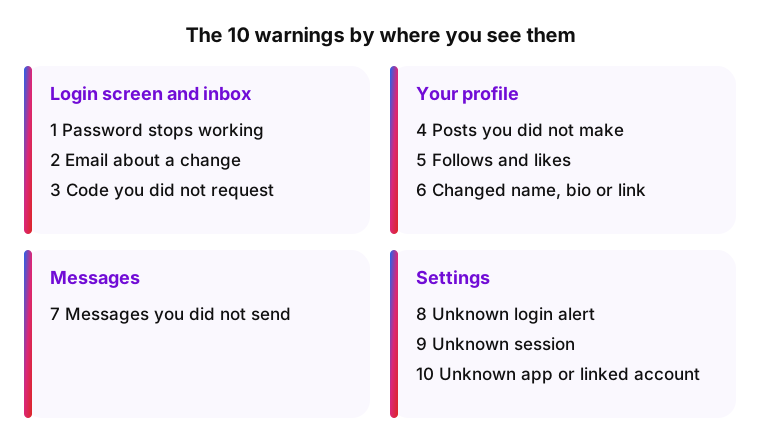
You can't log in or your details changed
- Your password stops working. Rule out a typo first, as Forbes suggests. With an Instagram account hacked and password changed, you stay locked out until you use the recovery steps below.
- An email about a change you did not make. A message from [email protected] saying your email address changed is the strongest warning. It contains a link to reverse the change (Help Center).
- A login code or two-factor authentication you did not request. An unexpected code may mean someone knows your password or is trying to reset it. An attacker can also add their own authentication app to keep you out (McAfee).
Posts, Stories or follows you didn't make
- Content you never published. Posts, Stories or Reels about crypto "investments" or giveaways are the usual pattern, according to McAfee.
- Follows and likes you did not make. Hundreds of new follows or random likes mean the account is used for spam.
- A changed name, bio, profile photo or link. Attackers rename an account to sell it or make scams look official.
Messages your followers say you sent
- Followers ask about strange messages from you. A link, a request for money or a "vote for me" message is usually phishing, a fake message that tricks people into entering their password on a copy of a real login page (Forbes, McAfee). Look for chats you never started.
Unknown devices, apps or linked accounts
- A login alert from a device you do not know. The city in the alert comes from the network and can be wrong on mobile data or a VPN, so judge by the device.
- A session you do not recognize. Where you're logged in (Accounts Center, Password and security) lists every active login.
- A linked account or app you did not add. It can keep access after a password change, so the Help Center says to remove it.
How to check if someone else is using your Instagram
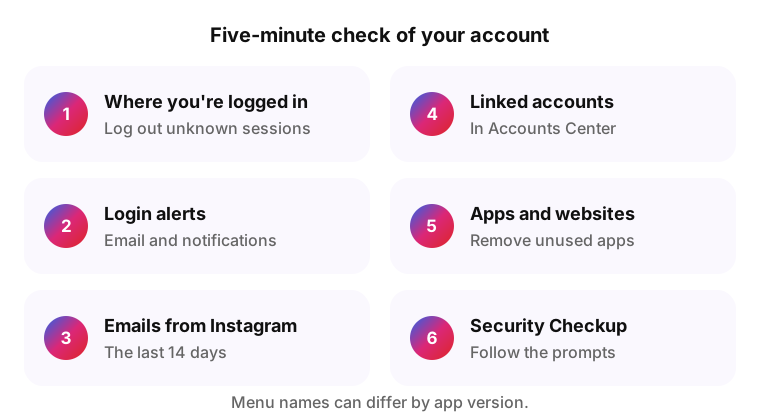
The answer to how to know if someone hacked my Instagram sits in your own settings, and the check takes about five minutes.
- In Where you're logged in, log out of every session you do not recognize.
- Check recent login alerts in your email and in the app notifications.
- Open Emails from Instagram in the security settings (menu names can differ): it lists the emails Instagram sent in the last 14 days (The Next Web, 2019). An alert missing from it is likely phishing.
- In Accounts Center, remove linked accounts you did not add.
- In Apps and websites, remove apps you do not use.
- Run Security Checkup.
Instagram hacked or a glitch: signs that aren't a hack
Some situations look like a takeover but are not, and each has a quick test.
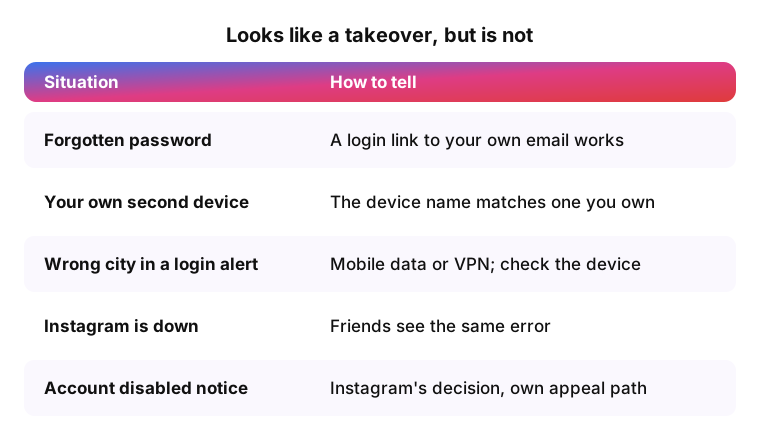
- A forgotten password after a new phone. A login link to your own email works, and no security email arrived.
- A login from your own tablet or second phone. The device name in Where you're logged in matches a device you own.
- A login alert from a nearby city. Mobile networks and VPNs can show the wrong city; if the device is yours, it is you.
- Instagram is down for everyone. Friends see the same error, and nothing in your profile changed.
- An "account disabled" or "suspended" notice. This is Instagram's decision about the account, not a takeover, with its own appeal path.
How attackers get into Instagram accounts
Knowing the way in tells you which gap to close.
- Phishing. Fake "copyright violation", "verification badge" or "account will be deleted" messages lead to a copy of the login page (McAfee).
- A reused password. After a leak elsewhere, attackers try the same email and password on Instagram (credential stuffing). Check your email on Have I Been Pwned.
- Follower and viewer services. Sites that promise followers or views ask for your login, and they can keep it.
- Malware. Malicious software on a phone or computer can read the passwords you type.
A tool that works with a public link does not need your password; a site that asks for your Instagram login is a red flag, as with apps that ask for your password.
What to do if your Instagram account is hacked
For an Instagram ID hacked through phishing or a leaked password, start at instagram.com/hacked in a browser on the phone or computer you usually log in from. The steps are from the Instagram Help Center; some are not available for every account type.
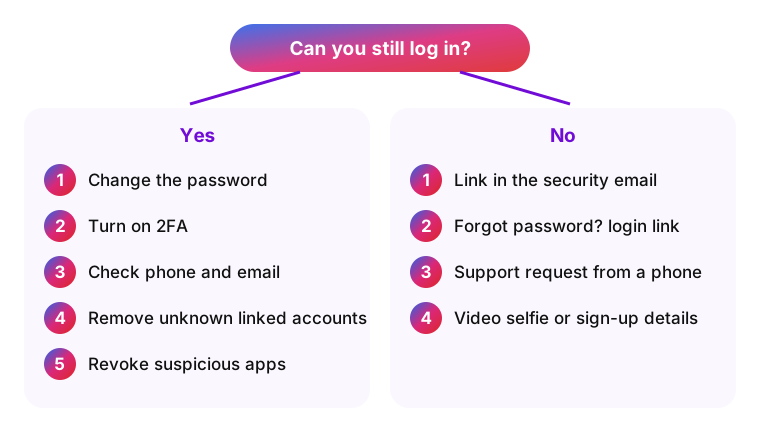
If you can still log in
- Change your password, or request a password reset email.
- Turn on two-factor authentication (2FA), a second code on top of the password.
- Check that the phone number and email are yours.
- In Accounts Center, remove linked accounts you do not recognize.
- Revoke access for any suspicious third-party app.
If the hacker changed your password, email or phone
The video selfie never appears on Instagram and is deleted within 30 days (Help Center).
- Find the email from [email protected] and use its link to reverse the change.
- On the login screen, tap Forgot password? and request a login link to your email or phone.
- If that fails, request support from a mobile device with a secure email only you can access.
- Verify your identity: a video selfie turning your head if the account has photos of you, or your sign-up email or phone and device type if it does not.
How to protect your Instagram after a hack
A hacked Instagram account can be taken again through the same gap, so close each one.
- 2FA with an app. Instagram offers codes by text or through an authentication app such as Google Authenticator, which does not depend on your phone number.
- Backup codes. Save them when you turn on 2FA, so a lost phone does not lock you out.
- A unique password, kept in a password manager.
- Your email. Whoever reads the linked inbox receives recovery links, so protect it with its own password and 2FA.
- No logins on third-party sites for followers, viewing or downloads.
- Security Checkup once a month.
Tell followers in a Story that messages sent from your account while it was compromised were not from you.
Instagram account security FAQ
-
Look for an email from [email protected] about a change you did not make, an unknown session in Where you're logged in, and posts or messages you did not send. Any of them is worth the full check.
-
The attacker usually changes the email, phone number and password to lock the owner out, then messages followers or posts scams. Act while the security email link still works.
-
Opening a message is generally not the danger. The risk is tapping its link and entering your password on a fake page, or downloading a file.
-
Yes. A session on another device or a connected app keeps working without the password. Check Where you're logged in and the apps with access.
-
Log out of unknown sessions, change the password, turn on 2FA, then remove unknown linked accounts and apps. A new password alone does not end an active session.
-
Not in those words. Instagram emails you when your email address or password changes and can notify you about new logins.
-
A downloader that never asks for your login does not put your account at risk. iGram works with a public link, never asks for your password and does not store links or files.
Sources
- Instagram Help Center: securing an account someone else got into
- Instagram: official account recovery flow
- Forbes: how to tell if someone took over your Instagram, September 18, 2026
- McAfee: what to do after an Instagram takeover, February 24, 2026
- The Next Web: Emails from Instagram helps spot phishing, October 8, 2019
- Have I Been Pwned: check your email for data leaks